celebrations

October cards

How quickly September has flown by. The leaves are beginning to turn colors and fall has officially arrived. We’ve enjoyed cool mornings and pleasant afternoons and evenings.

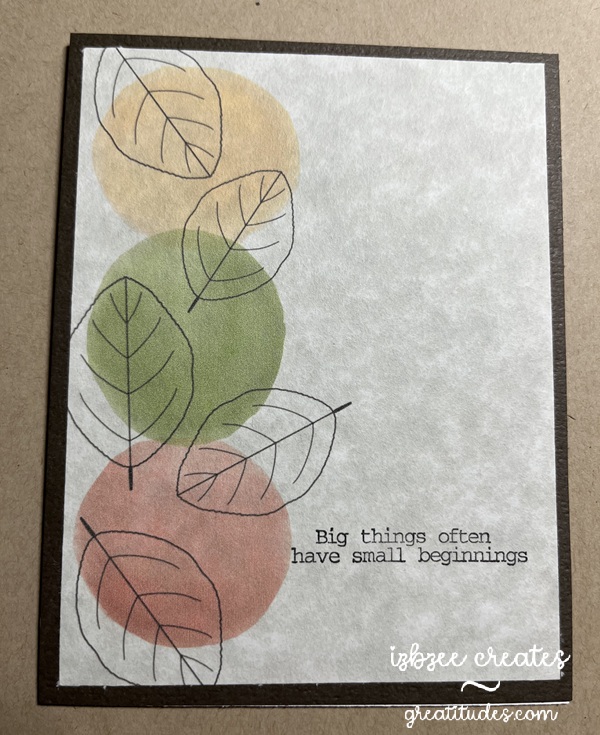
It’s also been fun to create cards using old and new techniques that will be delivered the first part of the month. This first card is the October ministering card. I saw a similar idea on Pinterest — but put my own twist on it using Procreate to “paint” the image using some of the techniques I’ve learned in a couple of online classes. The leaves are a brush from Sandra Createinspain. There were lots to choose from in a recent online offering. The sentiment stamp was found in a collection from Fun Stampers Journey (retired). Using my stamp jig made it very easy to add the sentiment on each card front after printing the main image.

We have two birthdays at the beginning of the month. Mother and daughter. I had a difficult time choosing the designs, but I think ultimately, these will work just fine for them this year. The first card is print to cut — I used Impact font, filling each of the letters with a patterned paper from Creative Fabrica. Each letter is backed with a cut in black paper set slightly to one side to create a shadow. Birthday script is done in Edwardian Script and all pieces are printed using the SCAL software’s Print 2 Cut process. The dry embossed piece is distressed and adhered to a regular A2 card base. The embossing folder is from Fun Stampers Journey (retired). I love using some of my older products! It can be used either vertically or horizontally as used in this card.

Maybe in next iterations, I’ll add some additional inking for a little more texture and depth.

The last card for this post was designed in SCAL 6 – using basic shapes from the library. The flowers and leaves are printed in a base color with additional depth and details added using colored pencils and an embossing tool. The label was created using basic shapes — a rectangle and oval and then using the Mirror Symmetry command under the Effects tab to create the shape – I added some additional details using a Winsor Newton .01 gray pen, a background stamp (Stampin’ Up! retired), and inking the edges after some distressing using an emory board to achieve the desired look. The Happy Birthday banner has been shaped a bit and glued in place before adhering the piece to the panel that was embossed using a Provo Craft embossing folder — another item from the cupboard. I really enjoyed seeing this one come to life — adding additional color to each flower and leaf was a great way to add som more depth and the embossing tool added the texture that made a lot of difference in how the light impacts the design.

As always, the Skycut performed well and each print 2 cut design was spot on! I’ve had the machine for over 4 years and haven’t had to make any additional adjustments to the calibration after the initial set up for my machine!

3 Fall Tags – Tag #1

It’s that time of the year again… the weather is changing, it’s football season and it’s finally getting cool again. I love Fall! Lots of good memories – leaves changing colors, bon fires, s’mores, hot chocolate and soup weather! And creating some fun tags of the season.

This year, I’m trying some new to me stuff including making sketches, using SCAL and some other software to design some elements as well as use tools and other stuff that haven’t seen the light of day for a while. This tag involves pulling a few things from the drawers and cupboards! I’ll bet you’ll be able to recognize a few of them!

Stamps (Stampin’ UP! retired), embossing powder (heat embossing), embossing folder (Cuttlebug, retired), inks and of course digital images from Sandra Createinspain. And to finish, some Mod Podge for a little shine and a bit of ribbon make up this tag.

that ornament file has a new life

With Christmas not too far away, let's just say, getting a head start is a good idea for this gal.  I should have started two months ago…. at least on my cards!  

IMG_1312

Pinterest inspired, this make was lots of fun and I even got to use some things from my stash and the scrap bin too!  
The file for the ornament is from Simply Crafty SVGs and the file I used for the H is from the 3D Letter SVG Kit at SVGCuts.com. (You get the whole alpha in the kit!) 

The 3d Round ornament gift box file was also used for some Halloween decor in my last post.  But I thought that changing it up to a bell would work too.  I did do a search for something similar in 3D, but struck out, so it was time to put things together to bring it to life.  

Bell

This is also where the paper yarn came into the crafting picture.  I needed something small to fit in the space between the halves of the ornament… but nothing seemed to work.  I tried wrapping paper around some cording, a pipe cleaner, and even designed a boxy trim – but nothing looked right.  While browsing the net one evening, I found a tutorial for making paper yarn.  The form I liked the best was using crepe paper and you can get about 9 yards of "yarn" from 1 yard of crepe paper when it's all spun.  I did need to get a drop spindle — but that was okay as I plan to use it for some other projects as well.  

Here's what my "yarn" looks like after it is spun.


Yarn

BELLS:  Once the ornament has been assembled following the video (here), glue the two halves together.  Get those edges close together.  When dry, you can apply the paper yarn.  I used Bearly Art craft glue to adhere the yarn in the area between the two halves.  

Decorate as desired. I used some die cuts (dies from Sizzix) and some wired ribbon I found at Hobby Lobby — yep, they're already setting their Christmas section!  

LetterH

Letter H:  Assemble the H according to the directions.  It really is an easy letter to put together.  Ink the edges of the H panel.  Decorate with a strip of black across the center of the H and add a second piece of black that has been threaded through the belt buckle.  I purchased a tin of buckles and frames from Oriental Trading quite a while ago and still had some that worked well for this project.  Adhere this panel to the front of the H and you're ready to display!  

As you can see, I made 3 of each – 3 bells and 3 H's.  You can display them in a several ways – and they'll be perfect for your holiday display this year and in years to come.  

IMG_1312

Happy Crafting!  Enjoy some creative time today and every day!  

a little more Halloween fun!

It's been a fun week in the studio.  I've enjoyed nearly every minute and even learned a new technique along the way that I've been able to incorporate into the projects I've been working on.  

Check out these cuties:  The original file is from Simply Crafty SVGs and is called the 3D Round Ornament Gift Box.  You'll find it here… all adaptations are mine and are not included with the original file.  when completed the boxes do not open.  

The pumpkin …

Punkin

has some additions after making as shown in the video on Sandy's site.  I inked the ornament heavily and then glued the two halves together. 

This box will not open and is for decorative purposes only.   
For the paper twist stem:  Untwist and "wrap" around the area where the hanger would be.   Glue in place.  I used Bearly Art Craft glue.  Hold in place until the glue dries a bit. 

The eyes are: 1/2 of a small styrofoam ball.  Just cut the ball in half and do a little rolling and molding to get them shaped as you'd like.  Wrap in crepe paper, glue and ink around the edges.  I chose hot glue to hold the eyes in place.  

The nose is a bead from my stash.  I made sure the hole was on the side and because of the solid  color of the bead, it is barely visible.  

The mouth is a piece of Paper Yarn that I made using some crepe paper and a drop spindle to "spin" the yarn and then dyed with ink.  I added some "stitching" lines after the "yarn" was glued in place with a thin line of hot glue.  

The green ornament is made the same way — halves glued together and lots of inking. 

Greenie

I did add some brown/grey moss to the neck of the ornament for a little more texture and interest.  The bugging out eyes are definitely fun and while I didn't ink around the edges, you definitely could if desired.  

Lastly for this post, I have used the Round Candy Box also from Simply Crafty SVGs and you can find it here.  I did alter the panel on the box and it was really easy to do so in SCAL 6 (you don't have to have the PRO version to do that either).  Ink the pieces of the box before assembly.  I added a strip of paper yard that I'd dyed black using ink and then filling in some areas with a black alcohol marker (Spectrum Noir).  The facial features are from a collection I found at Creative Fabrica.  You'll find it here but you'll need an all access subscription to get the best deal on this and thousands of other files you'll find you can't live without!  :)  Enabler Alert!

Frankie1
Lift the lid for more: 

Frankie2

I used permanent vinyl.  I did make an error when matting the white vinyl pieces, but decided not to mess with it and recut before layering and applying the vinyl — I kind of like the way it looks not being lined up perfectly.   I placed the eyes  of the facial details under the stitched paper yarn and the mouth on the box base – it's hidden until you open the box.  It was fun and something I've not seen done in a long while.  
Here's a quick video:  https://youtube.com/shorts/P8SxoSBgkEw?si=NbXJUyFqQePtQhLd

More coming soon….  Hoping you're enjoying some creative time!  Nurture your soul for a while today!

Halloween 2025

I got started early this year.  The inspiration for this make came from the Summer 2025 edition of Country Sampler.  Finding globes at the thrift store or yard sales around here is difficult to say the least — so remembering that I already had a globe file from a few years ago, decided to try to recreate the project, adding my own twist, using paper.  I think it turned out quite nicely!  And, yes, the globe can turn if you don't glue the hat to the top of the globe.  

IMG_1294

Files I used to create this:
Globe:  https://bribos.nl/product/108-globe/
Hat:  https://www.simplycraftysvgs.com/shop/holidays/halloween/smiling-jack-o-lantern/
Face:  https://www.creativefabrica.com/product/cute-pumpkin-faces-jack-o-lantern-faces/

AC cardstock (12 x 12)
Vinyl from stash
Heavy body black paint, 1 inch foam brush
embellishments from stash (cheese cloth, mini rosette, purple web, ribbon

SCAL 6 Pro to mat and Skycut C24 to cut paper and vinyl
eBrush, Spectrum Noir markers
Hot glue gun
Bearly Art Craft Glue
Straw

3 Summer Tags for 2025 – Tag 3

It's the final day of this year's reveal.  I've been impressed with all the tags that have been shared on our Facebook page for this challenge.  Looking forward to seeing today's grouping!  

Lemonade and some variations of lemonade are my favorite drink of the season.  I decided to create something that reflected that for my last tag this year.  The  mason jar file is from SVGCuts.  I've had it for ages and I'm really happy with how this one cuts and is so adaptable.  

IMG_1279

I think it's fun when you can use your stash to create something fun and playful.  I did use pattern fill for the straw (a simple narrow rectangle) and cut a second mason jar shape which was altered to add a layer of lemonade to the original base shape.  The cap is a scrap of some patterned paper that I've added some yellow ink to to have the background not be quite so stark.  The ice cubes are cut from vellum and I've added some lemon slices made of polymer clay to the bottom of the jar with a heavy body glue.  I'd originally planned on doing a shaker, but decided against that after the fuse tool wasn't doing a clean shape for me this go round.  I'll try again in the future to use the fuse tool as it's worked with previous projects with no problem.  I added a hanger of cotton twine to the back of the tag and there's sufficient space for some personalization on the back .